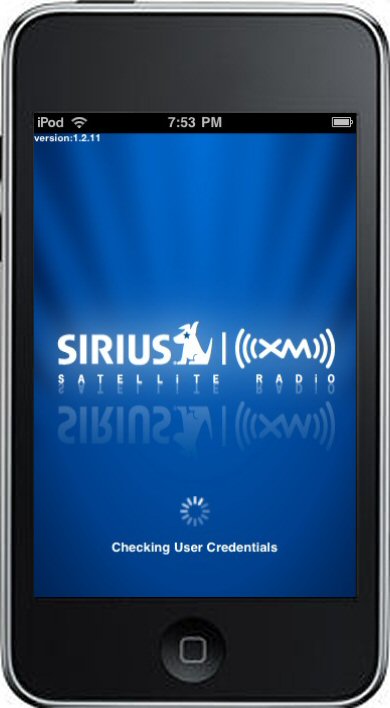
I only do APPraisals on apps I personally found interesting or useful enough to try. I don’t always end up liking every app, but I don’t buy or download something just to review it. I was hesitant to discuss the SIRIUS XM Premium Online app, though, because it requires a subscription on top of the app which can be a bit pricey. But given how much I use the app (a spoiler to what I think of it below), I figured a discussion of it and the ways I use it might be appropriate. Someone else out there might get some tips or have some for me as well.
Premise
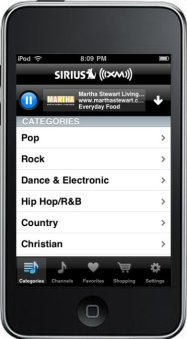
The app is a client for streaming SIRIUS XM radio via the internet to your iPhone / iPod Touch. A subscription is required for the app to work. Run the app, pick a channel, and begin listening. There are 16 Pop channels, 21 Rock channels, 4 Dance & Electronic channels, 7 Hip Hop/R&B channels, 7 Country channels, 3 Christian channels, 7 Jazz, Blues & Standards channels, 3 Classical channels, 3 Latin & World channels, 6 Sports channels, 8 Entertainment channels, 3 Family/Health channels, 4 Comedy channels, 9 News & Public Radio channels, 4 Religion channels, 7 Talk channels, and 4 Showcase channels in the app. Because it is a subscription based service, there are no ads.
Presentation
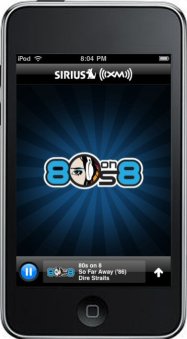
The graphics are consistent with what you would expect from this type of app. The app will show you the channel, artist and song you are listening to, but no cover art, so there are few graphics other than channel logos. It’s definitely not as well suited for discovering new music, like some streaming internet services.
The audio quality varies depending on whether you are using AT&T’s 3G or EDGE cellular service or you’re using wifi. Over wifi, SIRIUS XM claims “near CD quality” but then quotes a 128k bitrate, which is hardly near CD quality. I believe some pay internet streaming services deliver up to 192k, and free ones as low as 64k, so SIRIUS XM streaming falls somewhere in-between. It’s always sounded fine to me, though I am admittedly no audiophile.
Interface
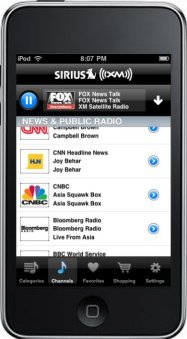
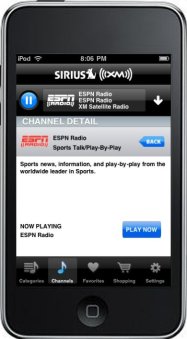
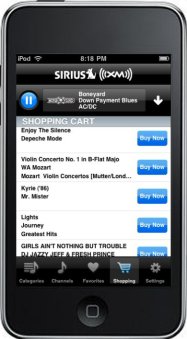
The app uses that now standard interface, with the home row of screen choices at the bottom. It’s no-frills but very intuitive. The Channels page lists the channels by category for easy browsing, and displays with each channel what is currently playing. You can save individual channels to a Favorites page, which will be the page you use most. Select a channel, and after a few seconds it starts play. At the top of every screen is a bar that displays what you are currently listening to. You can click on that bar and it flips over to reveal where you can add to your favorites, or click to buy that song from iTunes or add it to your shopping cart. While playing, you can hit the down arrow to minimize everything, leaving just a bar of what you’re listening to and the channel logo.
Freshness
Here’s how I use it. At home, I pop my iPod Touch into our existing JBL On Stage IIIP portable loudspeaker dock or our JBL On Time 400IHD loudspeaker dock with HD digital radio, and with my iPod Touch connected to the home wifi, I can listen to my favorite channels as I do other things. As a bonus, because I have the online subscription, which also works on the computer, not just the iPhone / iPod Touch app, I use our Macs and our AirPort Express, along with the programs Airfoil and Pulsar by Rogue Amoeba to stream synchronized SIRUIS XM audio all over the house. Pretty sweet.
Value
The app itself is free, but there are a few catches. First, as I mentioned before, you need to be a SIRIUS subscriber to use it. There are plans of varying durations, from 3 months for $38.85 ($12.95/mo) to 3 years for $349.00 ($9.70/mo). If you are already a subscriber, however, adding the online subscription is only $2.99/mo.
The second is that some of the channel lineup is not available on the iPhone / iPod Touch. These include MLB and NFL Play-by-Play, SIRIUS NASCAR Radio, and Howard Stern. You can access these if you use the XM SkyDock app, which functions similar to this one, but it requires the purchase of the XM SkyDock hardware. The hardware is $119.99 and has a built-in tuner, so you would not need an online subscription, but you would need an XM subscription (with added ‘Best of SIRIUS’ for premium SIRIUS channels) to use it.
All of that sounds pretty complicated and pricey, but there is free 7-day SIRIUS XM trial you can sign up for to try it out for yourself. In our case, it was a no-brainer. We already have a SIRIUS subscription for our primary vehicle, so adding $2.99/mo. to it to be able to stream SIRIUS online anywhere is a nice add. Aside from using it at home, I also listen to it via headphones at the office while I’m working. I keep an Apple Universal Dock plugged into the wall with a USB Power Adapter on my desk as well, so if the iPod Touch starts to run low on juice, I can drop it in there and still listen with my earbuds or plug the computer speakers in.
Controversy
To many of the reviewers in iTunes, the fact that the app does not allow you to stream Howard Stern seems to be a big issue. Stern has said “It was a rights issue and a whole entanglement thing. So, we’re not on it.” Stern fans flooded the iTunes store and gave the app 1 star because of that. I really don’t know the ins and outs of it all, but it all seems rather silly of Stern to do that. People are already paying a subscription + internet, or buying hardware + subscription to get the service. And Stern’s company is paid $100 million a year by SIRIUS XM. Quibbling that streaming over a laptop or notebook or desktop is different than streaming to the iPhone or iPod Touch seems a bit ridiculous.
To me an app is the sum of its parts, which is how I’m going to judge this one. You might decide that if Howard Stern is not included, then you don’t want the app, which is perfectly fine. But I wouldn’t give the app a 1 star rating on iTunes because Stern won’t let his show be listened to on the app. There are 116 other channels that don’t have any problem with being streamed to the device and work just fine. If you can live without Stern and some live sports programming (both of which are ok with me), and it all fits within your budget, it’s a fine app that delivers on what it promises, particularly for current users of the service.
Summary
Premise: Great
Presentation: Fair
Interface: Good
Freshness: Above Average
Value: Decent
Overall: Above Average App
Want more? ‘Appy to oblige. Check out my other APPraisals.








Leave a Reply