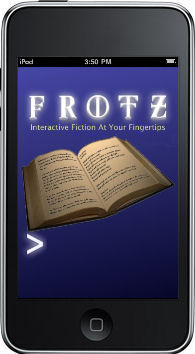
‘Appy Monday Interaction Fiction fans! For those who don’t know, Interactive Fiction (IF) games, a.k.a. text adventures, were popular back in the 70’s and 80’s, when games weren’t defined by the quantity of their pixels. From Colossal Cave Adventure (which I played on the mainframe when my dad would take me to his work) through the Infocom era, text-based games used gamer’s imaginations to supplement detailed and often humorous plots. Back in the day, games like Zork were household names. Frotz taps into the power of the iPhone / iPod Touch to … well, to run these games in all their non-graphical splendor.
Premise
Interactive fiction games are run via a standardized virtual machine known as a z-machine. Games formatted in the z-code format will play on z-machine interpreters. Frotz is a popular z-machine interpreter created in 1995, and has been available over the years for a variety of platforms. Frotz for iPhone / iPod Touch is a port of the Frotz application allows you to play a number of pre-loaded IF games on your iPhone / iPod Touch, as well as load your own.
Presentation
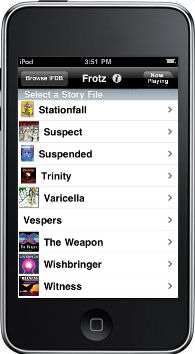
IF games are pretty no-frills, and the Frotz app is no different. When you run the app for the first time, it will load to a list of pre-loaded IF games. Select one and the game loads up the introduction and leaves you at the cursor for input. (Subsequent runs will default right into your current story.) The text looks sharp and readable (unlike my low-rez images here), and you can customize the background color and text font, color and size.
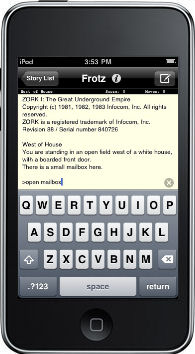
IF stories require text input in the form of instructions in the game such as “west” or “drop all except lantern” or “take analgesic”. Text input is also used for commands such as “save” or “restore” or “quit.” The iPhone / iPod Touch keyboard works very naturally for this.
Interface
The interface is simple, but serves the purpose. If none of the pre-loaded games appeal to you, you can browse the Interactive Fiction Database website, and download public domain games straight into Frotz with little advanced knowledge. For more technically-minded, there is also a File Transfer option, that will let you load your own files into Frotz via an FTP connection. Given the issues that the C64 emulator had with Apple (who would not let the developers include a function to load your own games into it), I’m surprised that Frotz is allowed that function. But I used it pretty extensively and it was easy to set up and worked fine.
Freshness
Frotz is not a new program, but it’s probably the best for running IF stories. The iPhone / iPod Touch version is very solid. The ability to download stories from IFDB website (to date there are 289 stories and growing) and load your own files through FTP really open up worlds of stories that extend the app’s usefulness far beyond other iPhone / iPod Touch game apps. There are adventures, mysteries, comedies, fantasies… tons of stories to choose from.
Value
Interactive Fiction games are easy to grasp, and sometimes hard to master. It really depends on how well each individual author wrote the story. They really require you to think and puzzle out what to do, and are definitely not for the twitch game crowd. As it says in the App store “Playing Frotz involves reading, thinking, and typing. If you just want to blow stuff up, this is not the app for you.” The app is free. The stories are free. Give it a try and see what the glory days of computer gaming were like. Just be careful not to get eaten by a grue.
Summary
Premise: Great
Presentation: Good
Interface: Above Average
Freshness: Good
Value: Excellent
Overall: Superlative App





Leave a Reply